
Best Cross Platform Testing Tools in 2026: 8 Reviewed by Category
Eight cross platform testing tools reviewed by category: cross-browser web, cross-platform mobile, device cloud, and AI-native. Honest pros and cons from practitioners.
- Written by
- Yuvan Sundrani
- Read time
- 13 min read
- Published

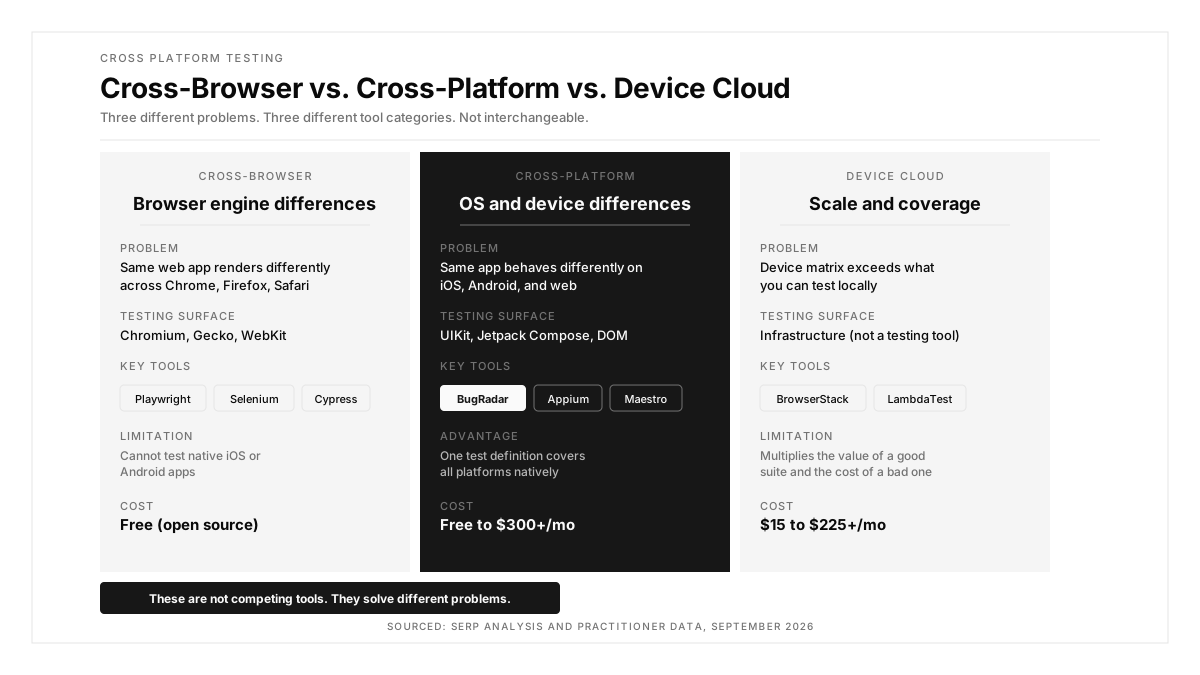
Cross-browser testing (does this web app work on Chrome, Firefox, and Safari?) is a different problem from cross-platform testing (does this app work on iOS, Android, and web?). The tools that solve one are largely useless for the other. A team that picks Playwright when they need native mobile coverage will find the gap in production, not in testing.
This guide splits the tools by what they actually cover, so you pick from the right category first. Each tool gets an honest review with where it falls short, because no single tool covers every surface.
Key Takeaways
- Cross-browser and cross-platform are different testing problems with different tools. Playwright solves cross-browser. Appium solves cross-platform mobile. BrowserStack provides the device infrastructure both run on.
- 43 percent of mobile developers identify testing as their top productivity bottleneck, per the JetBrains Developer Ecosystem Survey.
- Mobile testing takes longer than web testing for the same feature. The failure surface multiplies: app state, OS version, build type, device permissions, and cloud device slowness all produce failures that look identical in the log.
- The practical stack for most teams: Playwright for web browsers, Appium or Maestro for mobile, and BugRadar or a multi-tool combination for cross-platform E2E.
- BugRadar generates one intent-based flow that runs natively on iOS, Android, and web. When the UI changes, the agent self-heals instead of failing on a stale selector.
Which cross platform testing tools are teams using in 2026?
| Tool | Category | Best For | Pricing |
|---|---|---|---|
| BugRadar | Cross-platform E2E (iOS, Android, web) | Teams shipping all three platforms who want one flow that self-heals | Contact for pricing |
| Playwright | Cross-browser web | Engineering-led teams testing web apps across browser engines | Free, open source |
| Cypress | Cross-browser web | Frontend teams wanting fast feedback on JavaScript apps | Free tier; paid from $75/mo |
| Selenium | Cross-browser web | Enterprise teams with existing suites and multi-language bindings | Free, open source |
| Appium | Cross-platform mobile | QA automation engineers needing open-source mobile automation | Free, open source |
| Maestro | Cross-platform mobile | Teams wanting YAML-based mobile E2E with simple setup | Free tier; cloud pricing |
| BrowserStack | Device cloud | Enterprise teams needing real device and browser infrastructure at scale | From $225/mo |
| Katalon | Multi-surface codeless | Mixed-skill teams needing web, mobile, API, and desktop in one IDE | Free tier; paid plans |
Cross-platform E2E testing (iOS, Android, and web)
1. BugRadar: best for teams shipping all three platforms
The core problem for teams shipping iOS, Android, and web is maintenance multiplication. One UI change triggers selector fixes across three separate test suites. BugRadar collapses that to one intent-based flow that runs natively on all three platforms.
The agent describes tests in natural language, not selectors. When a button moves or a class name changes, it re-anchors visually instead of failing. It runs on every pull request and posts session replay directly back to the PR via CI/CD integration.
For teams that need real device testing coverage, BugRadar runs against real iOS and Android devices in the cloud, catching the device-specific regressions (permissions, push notifications, biometrics) that simulator-only suites miss.
When Airbnb needed to migrate 3,500 React test files across frameworks, engineers on r/ExperiencedDevs estimated 1.5 years of manual work. That is the maintenance scale that accumulates when you maintain separate suites per platform. BugRadar's single-flow model avoids that multiplication entirely.
Cross-browser web testing tools
2. Playwright: best for modern web apps
Playwright is the default choice for cross-browser web testing in 2026. It runs across Chromium, Firefox, and WebKit, handles parallel execution natively, and its auto-waiting eliminates most timing-related flakiness. The built-in trace viewer makes debugging faster than any other code-first option.
A tester who switched from Selenium on r/softwaretesting described the experience: Playwright works out of the box, finds elements more efficiently, waits automatically, and gives better error messages. Another engineer in the same thread noted: "Couldn't find a single article or post about someone switching the other way."
Where it falls short: Playwright is a cross-browser tool, not a cross-platform tool. Its experimental Android support is Chromium-only and cannot test native apps. If your team needs iOS and Android coverage alongside web, Playwright handles the web layer only. Pair it with Appium, Maestro, or BugRadar for the mobile side.
3. Cypress: best for frontend JavaScript teams
Cypress runs directly inside the browser, giving frontend developers real-time test reloading and time-travel debugging through DOM snapshots. For JavaScript-heavy single-page applications, the developer experience is excellent. The Cypress Dashboard adds test analytics, flake detection, and parallelization for teams that outgrow the free tier.
Where it falls short: Cypress does not support mobile at all. Multi-tab and multi-origin flows require workarounds. It is slower than Playwright for large parallel suites. For teams whose testing scope extends beyond the browser, Cypress covers only one layer of the stack.
4. Selenium: best for large established teams
Selenium supports every major browser, works with Java, Python, C#, Ruby, and JavaScript, and has been around long enough that almost every QA engineer has used it. The ecosystem and documentation are unmatched.
Where it falls short: Selenium is slow compared to Playwright. It does not auto-wait, so you write explicit waits or deal with flakiness. No AI capabilities, no self-healing, no codeless option. For new projects, Playwright has largely replaced it. For existing suites with thousands of tests, the migration cost keeps teams on Selenium. Playwright's browser support documentation details the engines it covers if you are evaluating a migration.
Cross-platform mobile testing tools
5. Appium: best open-source mobile automation
Appium provides a unified WebDriver API across iOS and Android, supporting any programming language. It is the established standard for mobile test automation with the largest third-party plugin ecosystem. Teams that need code-level control over native app interactions on both platforms start here.
A QA engineer on r/QualityAssurance described the shift from web to mobile testing: "Been doing web testing for years. Just took on mobile for the same product. Every sprint, same feature scope, but mobile testing seems to take longer." A commenter in the same thread identified the debugging surface: failures can stem from "app state, OS version, build type, device permission, Appium/WDA issue, cloud device slowness, push notification state, deep link issue, or just a bad install."
Where it falls short: Appium tests are slow compared to native frameworks (XCUITest, Espresso). Setup is complex: you need the right build, the right device or simulator, the right OS version, and the right Appium configuration. Cloud-based Appium runs can "take hours to run less than a hundred normal UI test cases," per the same thread. Teams with small mobile suites may find Maestro's simpler setup worth the tradeoff.
6. Maestro: best for simple mobile E2E
Maestro uses YAML-based flow definitions that run on both iOS and Android with minimal setup. No programming required. You write flows in plain text, and Maestro handles the platform-specific execution. For teams that want mobile E2E testing without Appium's complexity, Maestro gets you running faster.
Where it falls short: Maestro's simplicity becomes a limitation for complex test scenarios. No code-level control, limited assertion capabilities, and smaller community than Appium. It does not support web testing, so teams shipping both mobile and web still need a second tool. For enterprise-scale mobile automation with custom logic, Appium remains the more flexible choice. The practical recommendation from the mobile testing thread: "Avoid trying to mirror web automation one-to-one. Keep a smaller mobile automation pack around truly critical flows, then use manual and exploratory testing for gestures, interrupts, and device-specific behavior."
Device cloud infrastructure
7. BrowserStack: best device cloud at scale
BrowserStack provides 3,500+ real browsers, operating systems, and physical mobile devices in the cloud. It is execution infrastructure, not a testing tool. You pair it with Playwright for web, Appium for mobile, or BugRadar for cross-platform E2E.
A practitioner on r/QualityAssurance described the right hybrid approach: using AI to "cover the complete application in a few days" for regression testing, with manual testing reserved for the gaps that automation cannot reach. Cloud device labs enable that scale.
Where it falls short: BrowserStack charges for execution capacity. If your test suite is five scripts, the cloud lab is an unnecessary expense. Build your tests first on local simulators, then scale to a cloud lab when your device matrix exceeds what you can run locally. Simulators miss real-device behaviors like camera, GPS, biometrics, push notifications, and memory pressure, so the cloud lab eventually becomes necessary for shipping teams. LambdaTest (from $15/mo) and Sauce Labs (custom pricing) offer alternatives at different price points. Android's compatibility guidance exists precisely because screen sizes, API levels, and OEM skins diverge enough that simulator-only testing leaves gaps.
Multi-surface codeless testing
8. Katalon: best for mixed-skill teams
Katalon blends web, mobile, API, and desktop testing into a single IDE for teams with mixed skill levels. It offers both a codeless recorder and scripting support, so QA engineers and developers can work in the same platform. The free tier is generous enough for small teams to evaluate before committing.
Where it falls short: the all-in-one approach means Katalon is not best-in-class at any single testing surface. Playwright outperforms it for web. Appium has a larger mobile ecosystem. Enterprise features require paid plans. For teams that need depth in one area, a specialized tool is the better investment. ACCELQ and testRigor (from $300/mo) offer similar multi-surface codeless approaches with different strengths: ACCELQ for enterprise no-code automation, testRigor for plain-English test authoring.
How do you pick the right cross platform testing tool?
Four questions narrow the field.
What platforms do you ship to? Web only means Playwright or Cypress. iOS and Android means Appium or Maestro. All three means BugRadar or a multi-tool stack. This single question eliminates most candidates.
Do you share a codebase across platforms? React Native teams should evaluate Detox first. Flutter teams should evaluate Flutter's integration test framework. Native-per-platform teams need either Appium for a unified API or platform-specific tools (XCUITest plus Espresso) for maximum reliability.
Who writes the tests? If SDETs own automation, Appium or Playwright gives full control. If QA engineers write tests without deep coding skills, Maestro's YAML syntax removes the barrier. If nobody wants to own test maintenance, self-healing tools (BugRadar, Mabl) absorb the upkeep. A DevOps engineer on r/devops described AI tools that "planned and worked with hundreds of files, found what it needs to do, and did it first try."
What device coverage do you need? Two iPhones and two Android devices can run locally. Twenty device and OS combinations needs a cloud lab: BrowserStack, LambdaTest, or Sauce Labs. The cloud lab is where your tests run, not the tool that writes them. Pair it with the authoring tool that fits your team and budget.
Conclusion
Cross-browser testing and cross-platform testing are different problems. Pick the category first, then the tool. Playwright for web browsers. Appium or Maestro for mobile. BugRadar for cross-platform E2E across iOS, Android, and web. BrowserStack or LambdaTest for device infrastructure at scale. Do not pick a tool before picking the category it belongs to.
FAQ
What is cross platform testing?
Validating that an application works correctly across different operating systems (iOS, Android, Windows), device types (phone, tablet, desktop), and runtime environments (native app, web browser, PWA).
What is the best cross platform testing tool for mobile apps?
Appium for teams with SDET resources who want open-source flexibility. Maestro for simpler YAML-based flows. BugRadar for teams that want one flow running on iOS, Android, and web without maintaining selectors.
Is Playwright a cross platform testing tool?
No. Playwright is a cross-browser testing tool for web applications. It tests across Chromium, Firefox, and WebKit but cannot test native iOS or Android apps. For cross-platform mobile, use Appium, Maestro, or BugRadar.
How much do cross platform testing tools cost?
Open-source frameworks (Playwright, Appium, Espresso, XCUITest, Detox) are free. Cloud device labs range from $15/mo (LambdaTest) to $225/mo (BrowserStack). AI-native platforms start at $300/mo (testRigor) to custom pricing (BugRadar).
Can one tool test iOS, Android, and web?
BugRadar, testRigor, and Katalon support all three surfaces from a single test definition. Appium covers iOS and Android but not web. Playwright covers web but not native mobile. Most teams use a combination.
What is the difference between Appium and Playwright?
Appium automates native and hybrid mobile apps on iOS and Android. Playwright automates web applications across browser engines. They solve different problems and are often used together in cross-platform stacks.
Do I need BrowserStack for cross platform testing?
Only if your device matrix exceeds what you can test locally. Small teams can use simulators and local devices. Teams testing across 20+ device and OS combinations need a cloud lab for parallel execution.
How does cross platform testing fit into CI/CD?
Run web cross-browser tests (Playwright) and cross-platform E2E tests (BugRadar or Appium) on every pull request. Reserve full device-matrix sweeps for release candidates. Fast feedback on critical flows during development, broader coverage before each release.